
Blog
IQOS Iluma i Problems & Fixes UAE 2026: Easy Solutions


Is your IQOS ILUMA i ONE not responding? Device dead on you? You are in the right place. This guide walks you through every known IQOS Iluma i issue with direct fixes built for users across Dubai, Abu Dhabi, and the Emirates.
Whether your unit refuses to turn on, flashes weird lights, or drops connection, we sorted all common fixes below. Jump straight to your problem.
Master quick-fix reference table
| Problem | First Action | Secondary Action |
| Won’t turn on | Charge for 20 min | Cool down in AC + 10s reset |
| 3x Red LED flash | Remove stick, power off | 10-second button reset |
| Stick unread | Re-align insertion depth | Clean chamber & try new stick |
| Weak vapor | Align stick to silver line | Clean chamber; draw slowly |
| Auto-Start failing | Check app setting (Toggle ON) | Clean top rim; run reset |
| Burnt taste | Discard stick; cool down | Wipe interior; use real TEREA |
| App disconnects | Disable phone VPN | Unpair Bluetooth & re-pair |
| Charger dead | Clean USB-C port | Swap cable; use wall adapter |
| Overheating | Cool in AC for 15 min | Avoid parked cars |
| Battery drain | Charge fully via wall block | File warranty claim |
Won’t turn on
Causes and step-by-step fix for UAE users
If your device feels completely dead, take a breath. It is usually just a deep battery discharge or a thermal safety lockout from summer heat.
Most common causes in UAE
- Battery completely drained: Deep sleep locks out standard boot cycles.
- Thermal lockout: Internal sensors shut down power when cabin temperatures in parked cars or balconies cross safe thresholds.
- Firmware freeze: Temporary logic board glitch.
- Button obstruction: Dirt or pocket lint trapped around the switch.
- Contact grime: Dust blocking the gold charging pins inside the pocket unit.
Step-by-step fix
- Step 1: Check battery level — Dock the holder inside the pocket charger and tap the button. If no LEDs light up, the power bank is drained.
- Step 2: Charge for 20 minutes — Plug your pocket charger into a wall socket using the original USB-C cable and a standard UAE wall adapter. Avoid charging via laptop ports or weak power banks. Look for a pulsing white light.
- Step 3: Attempt power on — Hold the pocket charger button for 4 seconds. If the unit vibrates and pulses, it is booting up.
- Step 4: Clear heat lockouts — Did you leave the device in a hot car or direct sunlight? Move it into an air-conditioned room and wait 15 minutes for internal components to cool down.
- Step 5: Perform a soft reset — Place the holder in the case. Hold the main button down for 10 seconds until the lights flash white and fade out.
- Step 6: Clean contact pins — Remove the holder and wipe the gold contact pins with a dry cotton swab to clear out dust or lint.
- Step 7: Contact support — If nothing happens after these steps, the battery has failed. UAE purchases include a 12-month standard warranty.
Prevention tips
- Charge your device before it hits 0%.
- Never leave your kit on a car dashboard. Learn more about battery tech standards over at Wikipedia.
Blinking light guide
What every LED signal means and how to fix it in UAE
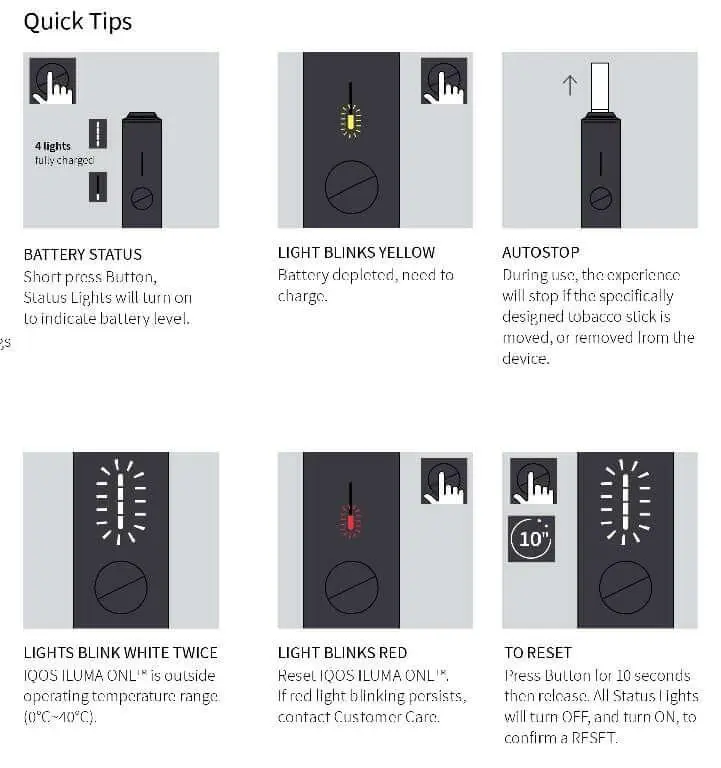
The LED lights tell you exactly what your device is thinking. Use this table to decode them.
Complete LED troubleshooting table
| LED Signal | Meaning | Fix Required |
| Solid White | Ready to use | Insert TEREA stick |
| Slow Pulsing White | Heating up | Wait 20 seconds |
| Fast Pulsing White | Session active | Enjoy |
| 2x White Flash | Session ending | Normal |
| Pulsing Yellow | Low battery | Charge soon |
| Solid Yellow | Charging | Leave charging |
| Solid Green | Fully charged | Ready |
| 3x Red Flash | System error | Perform 10s button reset |
| Red + Vibration | TEREA not recognized | Re-insert or replace stick |
| Alternating White + Yellow | Firmware update | Do not touch |
| 10x White Flash | Reset complete | Done |
| Rapid Red Pulsing | Too hot | Cool down in AC |
Fixing the 3x red flash
- Pull out the TEREA stick immediately.
- Turn the device off by holding the button.
- Wait 30 seconds.
- Place the holder in the case and hold the button for 10 seconds to reset.
- Insert a fresh stick.
Fixing “TEREA not recognized” (Red + vibration)
- Remove the TEREA stick and look at the tip.
- Check if the paper is crushed or wet.
- Clean the inside of the holder with a dry cleaning stick.
- Push a new stick down until you feel it click into place.
Weak vapor
Why it happens and how to fix it
Thin vapor usually points to bad stick insertion, chamber residue, or moisture damage from coastal humidity. Check our collection of TEREA Flavors for authentic stock options that perform consistently.
Common causes
- Bad insertion: Stick isn’t pushed down all the way.
- Residue build-up: Tobacco oils coating the inside chamber.
- Humidity exposure: Damp TEREA sticks stored in humid coastal air.
- Fast puffs: Drawing too quickly cools down the internal heating induction.
Step-by-step fix
- Push your TEREA stick straight down until the silver line sits flush with the top edge.
- Clean the interior chamber with an official dry cleaning stick.
- Store spare TEREA packs in dry, air-conditioned spaces.
- Wait for the second vibration before taking your first puff.
- Take slow, steady draws instead of hard pulls.
Auto-Start not working
Diagnosis and fix steps for UAE
If the device doesn’t start heating automatically when you insert a stick, check your app settings first.
Check app settings
Open the IQOS app, go to Device Settings, find Auto-Start, and toggle it ON.
Step-by-step fix
- Make sure your holder has battery power.
- Verify you are using genuine TEREA sticks. HEETS will not trigger the sensor.
- Clean the top rim sensor area with a dry swab.
- Update your device firmware through the app.
- Run a full 10-second button reset.
Burnt taste
IQOS Iluma i burnt taste from TEREA: Causes and solutions for UAE users
A burnt taste ruins a session fast. Here is how to fix it. If you suspect your current batch was compromised by storage issues, browse our official IQOS Iluma UAE lineup for replacements.
Common causes
- Re-using an already spent TEREA stick.
- Chain smoking back-to-back sessions in the summer heat.
- Counterfeit TEREA packs.
- Loose paper crumbs scorching at the bottom of the chamber.
Immediate fix steps
- Stop your session by holding the button.
- Throw away the used stick.
- Let the holder rest in an AC room for 3 minutes.
- Clean out any loose crumbs with a dry cleaning stick.
- Insert a fresh, genuine stick.
How to reset
Complete step-by-step reset guide
Soft reset (Try this first)
- Put the holder inside the pocket charger.
- Press and hold the Pocket Charger Button for 10 seconds.
- Watch the lights fade out and flash white.
- Release the button.
Hard reset (App method)
- Open the IQOS App on your phone.
- Go to Device Settings for your Iluma i.
- Select Restore Factory Settings and confirm.
| What a reset fixes | What a reset cannot fix |
| • Red light errors | • Physical drops or cracks |
| • Auto-Start failures | • Dead battery cells |
| • Bluetooth glitches | • Water damage |
| • Frozen LED displays | • Broken USB ports |
App not connecting
IQOS Iluma i app not connecting in UAE: Bluetooth fix guide
Step-by-step connection fix
- Turn off your VPN: Active VPN apps block local Bluetooth pairing on UAE phones. Turn it off.
- Check app region: Make sure your app profile is set to the United Arab Emirates.
- Clear phone Bluetooth: Go to your phone settings, unpair any saved IQOS connections, and turn Bluetooth off and on again.
- Stay close: Keep your charger within 1 meter of your phone during pairing.
- Re-pair: Open the app and follow the on-screen prompts to add your device fresh.
Charging case not working
5-step fix for UAE users
Step-by-step fix
- Check your power source: Plug straight into a wall socket. Avoid laptop USB ports.
- Clean the USB-C port: Clear out pocket lint or sand using a wooden toothpick.
- Clean contact pins: Wipe the gold pins on both the holder and inside the case with a dry cotton swab.
- Give it time: If the battery is completely flat, leave it plugged in for 20 minutes before lights appear.
- Reset the case: Hold the charger button down for 10 seconds while it is plugged in.
When to contact UAE support
When to contact IQOS UAE support: Warranty & service guide
If your device still fails after trying these steps, you are covered by a 12-month manufacturer warranty for manufacturing defects and internal hardware failures in the UAE. Check out our main Shop page if you need to look into new accessories or upgraded hardware variants.
Support options
- Call the UAE customer care hotline.
- Visit authorized IQOS retail stores in Dubai or Abu Dhabi for on-site checks.
- Open a support ticket via the official UAE web portal.
FAQ
IQOS Iluma i troubleshooting — Frequently asked questions
Why won’t my IQOS Iluma i turn on after a full charge?
Your device is likely stuck in a deep sleep state or locked due to thermal protection from the heat. Hold the power button for 10 seconds to force a reset, clean the contact pins, or let it cool down in an air-conditioned room for 15 minutes.
What does a red blinking light mean on IQOS Iluma i?
A red blinking light points to a system error, firmware glitch, or severe thermal lockout. Remove the stick, dock the holder, and hold the button for 10 seconds to reset.
Can I use IQOS Iluma i with HEETS if TEREA is unavailable?
No. Iluma i uses SmartCore induction heating made exclusively for TEREA sticks, which contain an internal metal element. HEETS require a central heating blade and will not work.
How do I reset IQOS Iluma i without the app?
Dock the holder in the case, then press and hold the charger button for 10 seconds until the status lights flash white and reset.
Why does my IQOS Iluma i taste burnt after cleaning?
Leftover moisture or non-standard cleaning items can scorch inside the chamber. Counterfeit TEREA sticks or taking rapid back-to-back puffs will also cause a burnt flavor.
Does UAE summer heat damage IQOS Iluma i permanently?
Leaving your device on a hot car dashboard triggers safety lockouts. While the safety shutoff protects the motherboard, repeated heat exposure will wear down the battery capacity over time.
How do I claim IQOS Iluma i warranty in UAE?
Official devices come with a 12-month warranty. Register your device online or bring your purchase receipt to any official IQOS boutique across Dubai, Abu Dhabi, or Sharjah.
Why does IQOS app show device offline in UAE?
Active VPN apps on UAE phones frequently block local Bluetooth connections. Turn off your VPN, turn on Bluetooth, and keep your device within 1 meter when pairing.
Is your device still acting up? Check out our complete Contact Us page or drop a comment below with your exact LED light code and our UAE technicians will help you out